Our blog has been a little quiet the last few weeks but it doesn’t mean we haven’t been busy. We have been hard at work on several things:
1. We moved into our new office at the Founders Den in the South Park area of San Francisco (right next to the ballpark). If you are ever in the neighborhood, please stop by and say hello!
2. We have been hard at work improving the performance of Screenleap.
3. We have been working on a lot of features that we will be rolling out in the next few weeks.
Performance Improvements
We have made a number of performance improvements to our screen sharing tool over the last few weeks. Users on modern web browsers should see a significant speed improvement and a decrease in latency. Latency is the time between when you see something on your screen and when your viewers see the same thing on their screen. Because all screen sessions have to go through our servers, there is an upper limit on how much we can reduce the latency but our goals is to reduce the latency to under four seconds for people on decent Internet connections. Chrome users will notice the greatest performance improvement as we were able to take advantage of Chrome’s fast JavaScript interpreter as well as its support for the latest HTML5 features to really rev up your screen sharing speed. We have more improvements planned for this coming month so stay tuned.
Gmail Login
If you use Gmail, you can now login into Screenleap using your Gmail account login. To do so click the “Sign in with Google” link on the login page. If it is your first time logging in with your Gmail account, you will be asked to grant permission to share your email address and other basic information. You can then use the Gmail login to access to your Screenleap account. If you already have a Screenleap account that you have registered using your Gmail address, you can sign in using the Gmail login feature and your account will be linked.
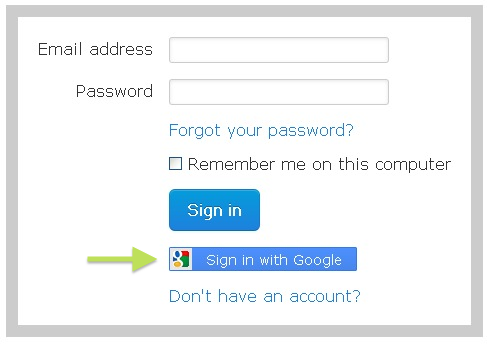
Login to Screenleap with your Google account
Upcoming Feature
While it’s convenient to be able to login into Screenleap using your Gmail account, we think it would be even more convenient to be able to screen share directly from your Gmail account. Stay tuned as we will be sharing more info about this exciting new feature in the next few weeks!
Screenleap is the best screensharing app’ ever. I fear you will be acquired, then put down (euthanized) by Cisco or some other evil empire because thier products suck compared to yours…if I was WebEx or FUZE or GoToMeeting or any other screensharing app’ I would be scared sh*tless by you guys at Screenleap….if Google acquires you (which would be smart on their part) then it could be integrated into all of their products and everyone would be happy….and you guys could retire to Maui…great product guys….keep up the great work…P.S. if you charged $1.00 a month (donation level money) then you could stay independent….I’m in at $1.00 a month (per initiating user; always free to guy on the receiving end), so is everyone else….P.S.S. don’t take Angel or VC money…you don’t need it and they are like Vampires on Viagra….they will suck your soul then screw you and leave you for dead….you’ve been warned (I once raised VC and Angel money in an earlier life)
Hello,
I think, that this is an excellent service and just, what I am looking for. But I have one question:
I my screen uploaded to your server and then shared with all participants and does that mean, that my transfer speed to the internet does not matter ?
Because my speed is less than 0,5 Mps and that causes problems, when I try to use Skype with several participants in a meeting.
What is also very good, is, that participants don´t have to download any software onto their computer, because many employees are not allowed to do that.
regards
Martin
Unfortunately, your Internet speed will make a differenc in the performance of the screen share. Your screen share will only be as fast as your Internet connection because we need to send the data in real time. The lag time of the screen share will be the time it takes for your screen data to be sent from your computer to our server and then onward to the viewer. The faster your computer and your Internet connection is, the faster your screen share will be.