Blog
Archive | 2020

Early-Access to Computer Audio Conferencing Now Available

We are excited to announce the early-access release of our new computer audio conferencing feature. Computer audio conferencing allows you to speak with the people in your meetings using your computer’s microphone and speakers. You no longer need to call a separate dial-in number in order to speak to each other, which makes it even easier and faster to start your meetings.

Enabling Computer Audio Conferencing

Audio conferencing is available to users on our paid subscription plans. If you are a paid subscriber, you can enable computer audio conferencing by going to your Settings & Preferences from the Account menu. Select Yes, use computer audio conferencing for the Audio Preferences setting and then save your change.

Using Computer Audio Conferencing

When you start a meeting with computer audio conferencing enabled, you will be able to speak to other people in your meeting using your computer’s microphone and speakers. Everyone will need to be on a computer with a microphone and speakers and using a modern browser (Chrome, Firefox, Edge, or Safari) in order to user computer audio conferencing. Computer audio conferencing also works for mobile viewers using any browser on Android and the Safari browser on iOS devices.

The microphone and speakers default to the defaults for your computer. You can change the microphone and speakers used by moving your mouse over the Room panel.
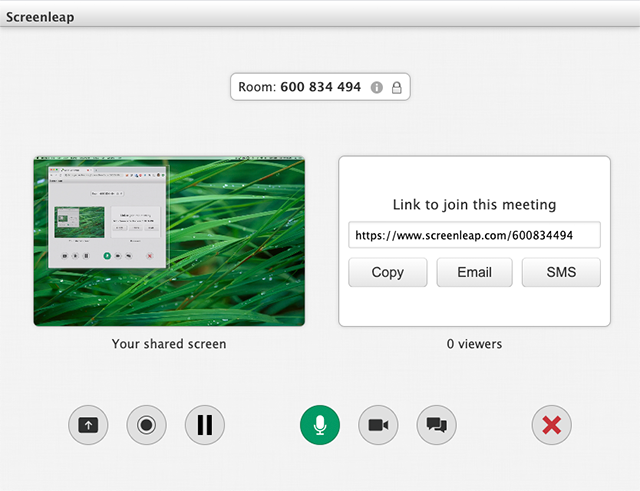
You can mute your microphone during your meeting by clicking on the microphone icon.

Limitations

Computer audio conferencing is currently only available when you use our our installation-free screen sharing option. Support for computer audio conferencing will soon be available in the Screenleap for Mac and Screenleap for Windows apps.

Computer audio conferencing is also limited to a maximum of ten participants during the beta period.

Share Your Feedback

We would love to hear what you think of the new computer conferencing feature and if you have any suggestions for improvements. We take your feedback very seriously!
Comments { 0 }

Taking the Next Leap Forward

Happy Leap Day everyone! In celebration of Leap Day, we are excited to announce that Screenleap will be taking the next leap forward with features that will make it even easier for you to share your screen and collaborate with anyone, anywhere. We want to give you a preview of some of the changes that you will be seeing to the service this coming week.

Installation-Free Screen Sharing

With the upcoming release, Screenleap will be returning to our roots with the return of installation-free screen sharing. When Screenleap was originally founded, we offered installation-free sharing through our Java-based presenter app. Unfortunately, as Macs and Windows moved away from Java due to security issues, we had to abandon the Java-based app in favor of our native apps, which required installation before you could share your screen.

We are excited that we will again be able to offer installation-free screen sharing for desktop users using Chrome and the latest Edge browsers (Firefox coming soon). Coupled with our installation-free viewing feature that we offer on all platforms, sharing your screen with the people you collaborate with has never been easier or faster.

Simpler and More Streamlined User Interface

We have been working hard to simplify the Screenleap service to make it even easier for you to use. We have made two changes that should make sharing your screen even easier:

  1. We removed the need for your to decide whether you should a private screen share or a broadcast. If you want to share your screen now, you can now simply click the Meet now button. For paid users, you can decide if you want to lock your meetings by default. If your meetings are unlocked, your viewers can join your meeting to view your screen by going to your personal link (https://screenleap.com/[handle].  If your meeting is locked, your viewers can join your meeting by going to the 9-digit screen share code for your meeting (i.e., https://screenleap.com/[screen share code] or by going to your personal link and entering the 9-digit screen share code. You can also specify your own access code if you prefer.
  2. Everyone can now schedule meetings (free accounts are limited to 2 upcoming meetings at a time). Previously, free users could only start on-demand screen shares, which is problematic if you have back-to-back meetings and you are sharing to your personal URL (https://screenleap.com/[your handle]).

Unified Presenter Interface

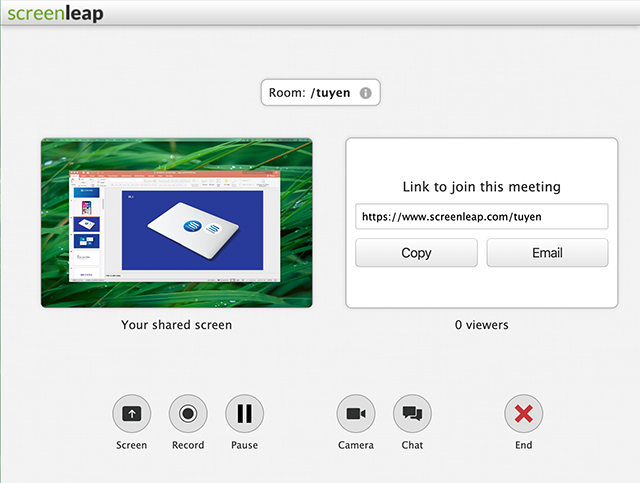
We have moved all the controls that you will use during your meetings into a unified web interface that all the presenter apps will use. No matter what operating system you are using, you will soon be able to control your meeting using the same familiar interface.

The new presenter interface includes a preview of your shared screen so you can check ahead of time that your screen share is working correctly.

We have also made it easy to change your meeting settings during your meeting, instead of requiring you to configure everything in advance:

  1. You can now start recording your meeting after your meeting has already started. Previously, you had to enable recording before starting your meeting.
  2. You can now start and stop recording your screen multiple times during your meeting. Previously, you could only start recording when your meeting started and stop recording when your meeting ended.
  3. You can now change the quality of your screen share during your meetings. For example, you may want to increase the quality if you are sharing a complex spreadsheet (high quality image but lower frame rate) or lower the quality when sharing a video (for better frame rate).

Coming Soon

There are many more exciting features that will be included in the upcoming release, but we wanted to share some of them with you now so you can hopefully get as excited as we are. Wishing everyone a Happy Leap Day again!

Comments { 0 }