Blog
Archive | 2015

Simplify Sharing With Gmail Integration For Screenleap Browser Extension

We would like to share with you some recent changes that we have made to our browser extensions:

  1. We have merged the functionality in the Screenleap for Gmail browser extension into the Screenleap browser extension.
  2. Java is no longer required to share your screen with the new Gmail integration. All you need is the browser extension.

All-In-One Extension

You no longer need to install a separate browser extension to integrate Screenleap with Gmail. It has now been added to the Screenleap browser extension. We decided to merge the two extensions together to reduce the confusion caused by having multiple browsers extensions and to make it easier to enhance the extension in the future. The merged Screenleap extension will be the only extension that we support going forward. Please uninstall the Screenleap for Gmail extension if it’s installed and install the merged Screenleap extension.

Java No Longer Required

The Screenleap for Gmail extension required that Java be installed in order to share your screen. This requirement created a hassle if you did not have Java installed as you would have to download Java, install it, and restart your browser before you were able to start sharing your screen. With the new Gmail integration, all you need is the browser extension.

How To Use

Install the Screenleap extension and then refresh the Gmail tab. Once installed, two new icons will appear in the bottom of your Gmail compose window. To start a new share from Gmail, simply click on either the screen or browser icon. The screen icon is used to initiate sharing of your entire screen. The browser icon is used to initiate sharing of just your browser window.
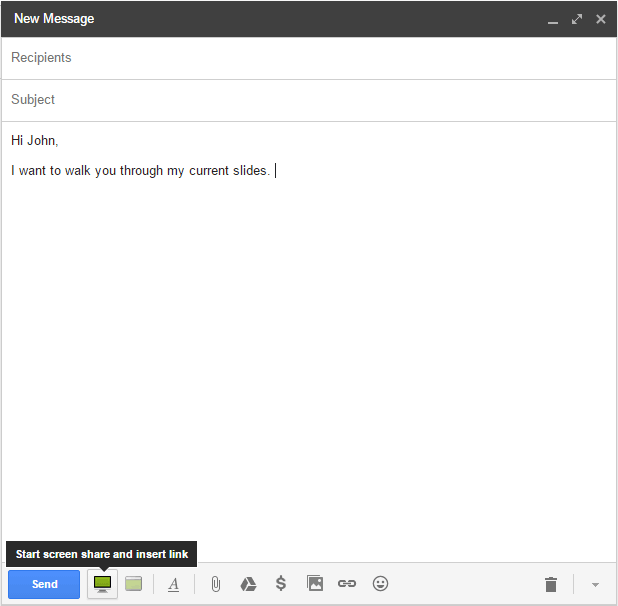
screenleap_gmail_integrationOnce your screen is shared, the share link will automatically be inserted into your email message. You can then share the view link with your viewers by emailing them directly from Gmail.

Future Integrations

We will be integrating the Screenleap extension with other tools that you frequently use. Please let us know what integrations you would like to see!

Comments { 0 }

Happy 2015!

2015Happy New Year Screenleapers!

As we bid goodbye to another great year, we would like to highlight the enhancements made to Screenleap in 2014 to make screen sharing even easier for you and give you a preview of what’s in the works for 2015.


2014 HIGHLIGHTS

Branded Company Account

We added the ability to customize the look-and-feel of your accounts so that you can increase your viewers’ exposure to your brand for those important sales, support, and training calls. The Branded Company Account also includes support for integrating the screen share viewer into your website, so your users don’t have to leave your site to view your screen shares.

Web Chat

You can now quickly communicate with your viewers during your screen shares without having to jump on a call with our integrated web chat feature.

Screenleap for Support

Screenleap for Support allows you to easily see someone else’s screen so that you can provide them with better support. All you need to do is send a link to the person whose screen you want to view. The person will be guided through a quick install and then you will be able to see the person’s screen.

Meeting Scheduler

You can now schedule screen shares in advance using the meetings feature. Meeting participants will receive an email that includes a link to the meeting and information for connecting to the audio conferencing bridge.

HD Audio Conferencing

We have upgraded our audio conferencing service so that you can enjoy crystal-clear conference calls.


COMING UP IN 2015

Faster Screen Shares

We have a beta version of a new web technology called WebRTC available on our browser extension for you to try out. WebRTC allows us to reduce the latency so that changes to your screen show up on your viewers’ screens faster. We will be rolling out the technology to all our presenter apps later this year.

Recording

We will be launching support for recording your screen shares to both our subscribers and to our API developers at the end of the month. The recording feature will allow you to record your screen shares for later playback.

Integrated Audio

We will be adding support for sharing audio directly from your computer so your viewers won’t need to dial-in to hear your presentation.

iPhone/iPad/Android Sharing

We will be adding support for sharing from your iPhones, iPads, and Android devices later this year.

Collaboration Features

We will be making Screenleap more interactive this year. To start, we will be adding support for viewing your viewers’s mouse so that your viewers will be able to point things out to you during the presentation.


WISHING YOU A HAPPY 2015

We would like to thank you again for making 2014 a great one. We really appreciate all the feedback and suggestions that you have provided us over the last year: Screenleap is the tool it is today because of you. Wishing you lots of health, happiness, and success in 2015!

Comments { 0 }